Live Weather: Real & Forecast
- 4.5
- Rating
- 100.00K
- Installs
- Free
- Price
 Analysis by App-foxy
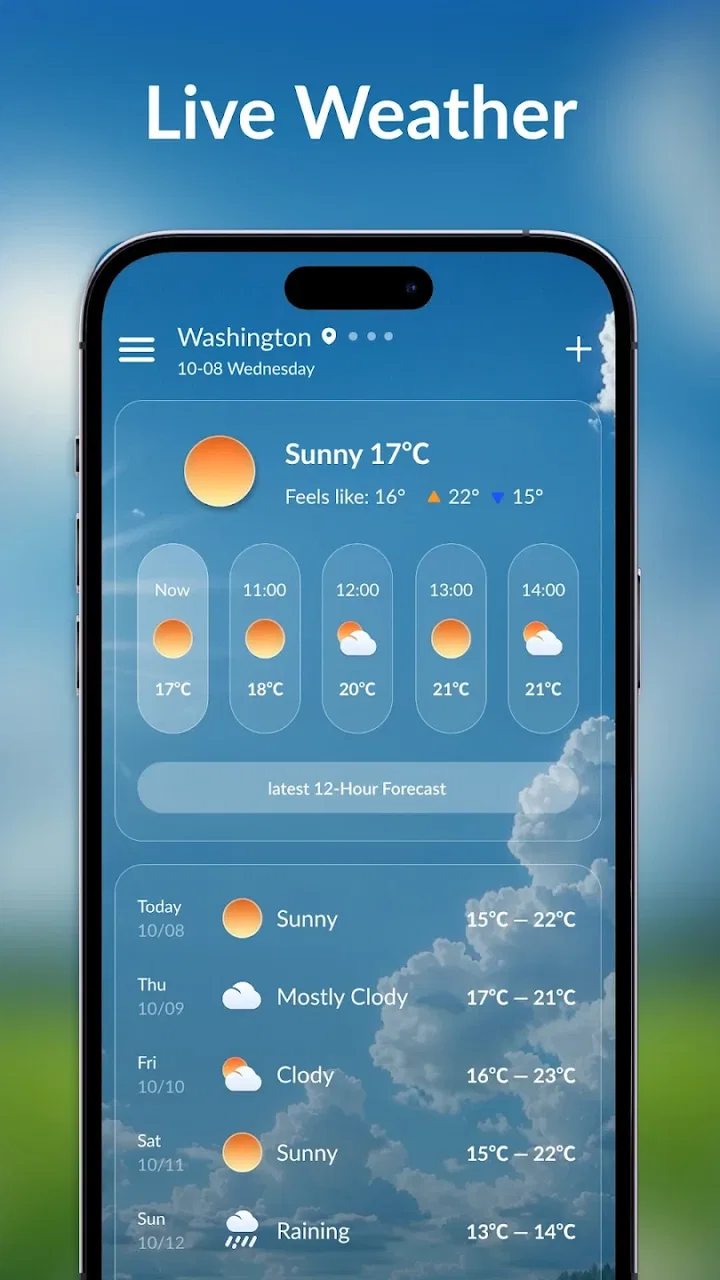
I usually judge a weather app by what happens in the few seconds when I actually need it: before leaving home, while planning a walk, or when dark clouds appear over the road. Live Weather: Real & Forecast takes a straightforward approach to those moments, offering current conditions and a five-day outlook rather than trying to become an all-purpose lifestyle platform. That simplicity is its main appeal, but it also means the app is best understood as a quick weather reference, not a complete planning system for every situation.
After spending time with it, I found the experience easy to approach. The app belongs to the weather category, comes from Wah Hub, and is free to use. It is suitable for Everyone, which makes it a reasonable option for a shared family phone or for someone who wants a basic forecast without learning a complicated interface. It supports Android 7.0 and newer, while the current release is version 1.0.2.
The public response is encouraging without being overwhelming: Live Weather: Real & Forecast has a 4.5 average from around 500 ratings and has passed 100K installs. I would not treat those figures as proof that it will suit every location or routine, but they do suggest that the app has already attracted a meaningful group of users. My own recommendation is cautious but positive: it is worth trying if you value a focused screen and short-range visibility, provided you do not expect specialist warnings or deep meteorological tools.
You May Also Like

 Blood Strike: 2.5 Anniversary
Blood Strike’s Loadouts Turn Every Drop Into a Tactical Gamble
A close look at Blood Strike’s custom loadouts: how fast access to signature weapons reshapes its battle royale rhythm, rewards preparation, and narrows the gap between fights.

 Pandora - Music & Podcasts
Pandora’s Music Is Easy to Start, but Harder to Recover
Pandora’s strength is its low-effort path from a seed to a station. Its weak spot is how much confidence it asks you to place in connection, setup, and quiet recovery.

 8 Ball Pool
 Is Built on Rivalries, Rematches, and Routine
A close look at the rivalries, rematches, shared routines, and unanswered safety questions that turn a quick pool match into a persistent mobile community.

 Samsung Music
’s Quiet Strength Is Playing What You Already Own
Its reach comes less from spectacle than from dependable access to a personal library. That simplicity is both the app’s strongest retention engine and its ceiling.

 AccuWeather: Weather Radar
AccuWeather Review: A Quick, Clear Forecast for Everyday Decisions
For everyday plans, the best forecast is the one you can understand quickly. AccuWeather makes rain timing, radar, and local conditions easy to act on, with a few trade-offs.

 Hill Climb Racing
Why Hill Climb Racing Still Turns Crashes Into One More Run
A tiny car, a bumpy hill and one more upgrade: Hill Climb Racing keeps resurfacing because its simple chaos makes every near-miss feel personal.
More From Our News Desk
View All News


How the app earns trust through a focused design
When I think about why this app feels approachable, I come back to how clearly its purpose is bounded: it helps me check conditions and look a few days ahead without asking me to treat a forecast as a guarantee. That focus makes it easier to build a sensible routine around the information, especially when I pair a quick glance with my own observations and reserve more authoritative sources for safety decisions.
A weather tool that stays close to the everyday question
The strongest part of the experience is the narrow purpose. When I open a weather app, I normally want an answer to one of three questions: what is happening now, what should I expect later today, and what is likely over the next few days? Live Weather: Real & Forecast is built around that sequence. Its live information handles the immediate decision, while the five-day view gives enough range for ordinary planning.
That makes it more approachable than weather services that place radar layers, climate graphs, severe-weather feeds, air-quality panels, pollen details, and multiple maps on the first screen. Those tools can be valuable, but they can also make a quick check feel like research. Here, the limited scope reduces the amount of interpretation I have to do before deciding whether to take an umbrella or change an outdoor plan.
The trade-off is important. A compact forecast should not be confused with a specialist weather workstation. If I were preparing for a long hike, checking conditions for a flight, monitoring a storm, or making a work decision where weather creates safety risks, I would want a service with clearly presented alerts, detailed hourly information, and specialist layers. This app is more comfortable in the role of a daily companion.
What I look for before trusting a forecast
Weather information is only useful when I can understand its time frame. A current reading and a multi-day forecast answer different questions, so I pay attention to whether I am looking at what is happening now or what is predicted later. That distinction is especially important when the weather changes quickly. A pleasant current view does not guarantee a pleasant afternoon, and a five-day estimate should not be treated with the same confidence as an immediate condition.
My practical habit is to use the live view for decisions within the next hour and the five-day view for broad planning. I would not use the longer range to make a precise promise about an outdoor event. Instead, I use it to identify which day deserves a closer check later. This is one of the most useful ways to avoid overconfidence with any forecast, including this one.
The app’s name emphasizes real-time information and forecasting, but I still keep my expectations measured. “Live” is useful as a description of current weather information; it is not a guarantee that every local change will appear instantly. Conditions can vary across a short distance, and forecast accuracy naturally changes with time and location. That is not a flaw unique to this app, but it is a reason to treat the display as guidance rather than certainty.
Visible choices matter more than impressive wording
When I review a weather app, I also consider how comfortable it feels to use without being pushed into unnecessary decisions. A trustworthy experience should make the main weather information easy to find and should not make ordinary use feel dependent on extra commitments. Live Weather: Real & Forecast benefits from its direct purpose because there are fewer reasons for the interface to distract me from the forecast itself.
At the same time, I avoid assuming anything about privacy or permissions that is not visibly explained in the app experience or its official documentation. A clean interface does not automatically prove minimal data collection, and a free download does not automatically explain how a product is supported. My advice is simple: read the permission prompts carefully when installing, allow only what makes sense for the location experience you want, and review the platform’s app controls if you later change your mind.
This is particularly relevant for weather apps because location can be sensitive. If a weather tool asks to use location, I want to understand whether that choice is necessary for my preferred workflow or whether I would rather select a place manually. The right decision depends on how often I move between locations and how much convenience I am willing to exchange for control. I would not grant access automatically just because the app belongs to the weather category.
Using the five-day view without letting it dictate plans
The five-day forecast is most useful when I treat it as a planning window. For example, if I am deciding which day to wash a car, schedule a casual picnic, or commute by bicycle, I can compare the general outlook and choose a promising day. I then check again nearer the time, because a forecast several days away is a starting point rather than a final answer.
A less obvious advantage of a five-day horizon is that it helps me notice uncertainty in my own plans. If the outlook appears unsettled across several days, I can prepare a backup activity instead of waiting until the last minute. If one day looks consistently more suitable, I can reserve it while keeping expectations flexible. This is a better use of the feature than treating every icon or temperature indication as a precise schedule.
There is also a useful discipline here: compare the forecast with what you can observe outside. If the current display and the sky disagree, do not assume one glance settles the issue. Local terrain, buildings, coastal effects, and rapidly developing showers can all make a nearby observation more relevant than a broad prediction. The app can support a decision, but it should not replace ordinary judgment.
A realistic morning routine
Imagine I am leaving for work on foot. I open the app before breakfast and check the live conditions first. If the weather looks comfortable, I look ahead to the part of the day when I will return rather than focusing only on the walk out. Then I use the five-day outlook to see whether tomorrow’s commute deserves a different choice, such as taking public transport or carrying a rain jacket.
That workflow takes advantage of both parts of the product without asking it to do too much. The live information helps with the immediate trip, while the longer forecast supports a small adjustment to the week. If I were cycling a long distance or working outdoors for hours, I would want more detailed timing and safety information before relying on the app alone. For a normal commute, however, this is the kind of simple routine where its focused design makes sense.
Where the experience may feel limited
The same restraint that makes the app approachable can frustrate users who want depth. Someone who checks weather by the hour, compares several cities, follows storm movement, or needs specialized environmental readings may quickly reach the edge of what this product is intended to provide. I would choose a richer alternative for detailed trip planning, outdoor work, or situations where changing conditions need close monitoring.
I also would not install it expecting a complete replacement for every weather source on my phone. A general forecast app can be excellent for quick orientation while a local authority or specialist service remains the better place for urgent warnings. That two-source habit is sensible when conditions are hazardous: use the convenient daily view for routine decisions, then consult official alerts when safety is involved.
Another point is forecast interpretation. A five-day display is naturally more useful for broad trends than exact timing. If I need to know whether rain will arrive during a particular short appointment, I want more granular information than a general multi-day panel may provide. In that situation, another service with detailed hourly breakdowns would be a better fit.
Who will appreciate it most
I think this app suits people who want a low-friction weather check on an older or broadly compatible Android device. Its support for Android 7.0 and above gives it a practical reach, and its Everyone rating makes it easy to consider for ordinary household use. It is also a sensible candidate for someone moving away from a cluttered weather app and wanting current conditions plus a short forecast without a long learning curve.
It works particularly well for routine decisions: choosing clothes, deciding whether to walk, planning a casual outdoor meal, checking the next commute, or selecting a day for a simple errand. The free price removes the usual barrier to testing it, so I can try it alongside my existing weather source instead of making an immediate all-or-nothing switch.
I would be more hesitant to recommend it as the only weather tool for travelers crossing several regions, people who spend long periods outdoors, or users who need detailed alerts and specialist information. Those users should prioritize an app whose controls and forecast detail match the consequences of being wrong. A clean five-day view is convenient, but convenience is not the same as comprehensive coverage.
Practical habits for better control
My first tip is to decide how much location convenience you actually need. If you mostly check the weather in one place, manually choosing a location may feel more controlled than allowing automatic access. If you travel frequently, automatic location can save time, but I would still review the permission choice rather than accepting it without thought.
My second tip is to separate “now” from “later” every time you open the app. Use the current information for immediate clothing and travel decisions, then use the five-day view for rough planning. This small habit prevents a common mistake: treating a distant forecast as though it were a live observation.
My third tip is to create a confirmation point for important plans. If I am organizing an outdoor activity, I use the five-day outlook to choose a likely day, but I check again closer to the event and consult official warnings if severe weather becomes a possibility. This makes the app useful without placing more responsibility on it than a general weather tool should carry.
My fourth tip is to keep an alternative source available for unusual circumstances. That is not an indictment of this app; it is good practice for any general forecast product. When the weather is ordinary, Live Weather: Real & Forecast can be the quick first check. When conditions become dangerous or unusually local, a dedicated warning service is the safer second step.
My final view after using it
Live Weather: Real & Forecast is a focused, free weather app from Wah Hub that does its best work when I need a fast answer rather than a deep meteorological report. The combination of current information and a five-day outlook covers the basic rhythm of everyday planning, and the Everyone rating and broad Android compatibility make it approachable for many users.
I appreciate that its value is easy to understand. I can open it for a quick look, use the longer view to organize the next few days, and avoid the clutter found in more ambitious weather platforms. Its main weakness is equally clear: users who need hourly precision, specialist layers, or dependable safety guidance will likely need another option alongside it.
My cautious verdict is that this is a good first-stop weather app, not a complete weather command center. I would recommend trying it if your needs are ordinary and you prefer a direct interface. I would keep my permissions deliberate, treat forecasts as guidance, and switch to a more detailed or official source whenever the decision involves serious travel, outdoor exposure, or severe conditions.
For readers deciding whether to download it, the answer comes down to control and expectations. If you want a free way to check the weather now and plan broadly across the next few days, it is a sensible candidate. If you expect extensive customization, advanced monitoring, or highly detailed warnings, choosing a specialist alternative will be more satisfying. In my experience, the app is most trustworthy when I use it within that clear boundary.
FAQs for Live Weather: Real & Forecast
01What features does Live Weather: Real & Forecast offer?
Live Weather: Real & Forecast provides real-time weather updates, accurate forecasts, and detailed information on temperature, humidity, and wind speed. It also includes interactive radar maps, severe weather alerts, and customizable notifications. Users can view weather conditions for multiple locations, making it ideal for travelers or those with family in different regions.
02How accurate is the weather forecasting in the app?
The app uses advanced meteorological data from reliable sources to provide highly accurate forecasts. It updates data frequently to reflect real-time changes in weather conditions. While no forecasting tool can guarantee 100% accuracy, Live Weather: Real & Forecast is considered reliable by most users due to its consistent performance and timely alerts.
03Is Live Weather: Real & Forecast free to use?
Live Weather: Real & Forecast offers a free version with basic features, suitable for most users. However, there is a premium version available that unlocks additional features such as ad-free browsing, enhanced radar maps, and extended forecasts. Users can choose to upgrade based on their needs and preferences.
04Does the app require an internet connection to function?
Yes, Live Weather: Real & Forecast requires an internet connection to download the latest weather data and updates. However, once the information is downloaded, users can view recent weather conditions offline. For the most accurate and up-to-date information, a stable internet connection is recommended.
05Can I customize the notifications in Live Weather: Real & Forecast?
Absolutely. Users can customize notifications to receive alerts on severe weather conditions, daily forecasts, and specific weather changes that matter to them. The app allows you to set the frequency and type of notifications, ensuring you only receive information that is pertinent to your location or interests.
Pros
- Accurate real-time weather updates.
- User-friendly interface with easy navigation.
- Customizable alerts for severe weather.
- Detailed forecasts for up to 10 days.
- Supports multiple locations for tracking.
Cons
- Contains ads in the free version.
- Requires internet for updates.
- Limited widget customization options.
- Some features locked behind paywall.
- Occasional bugs in radar animation.

Live Weather: Real & Forecast
Gallery